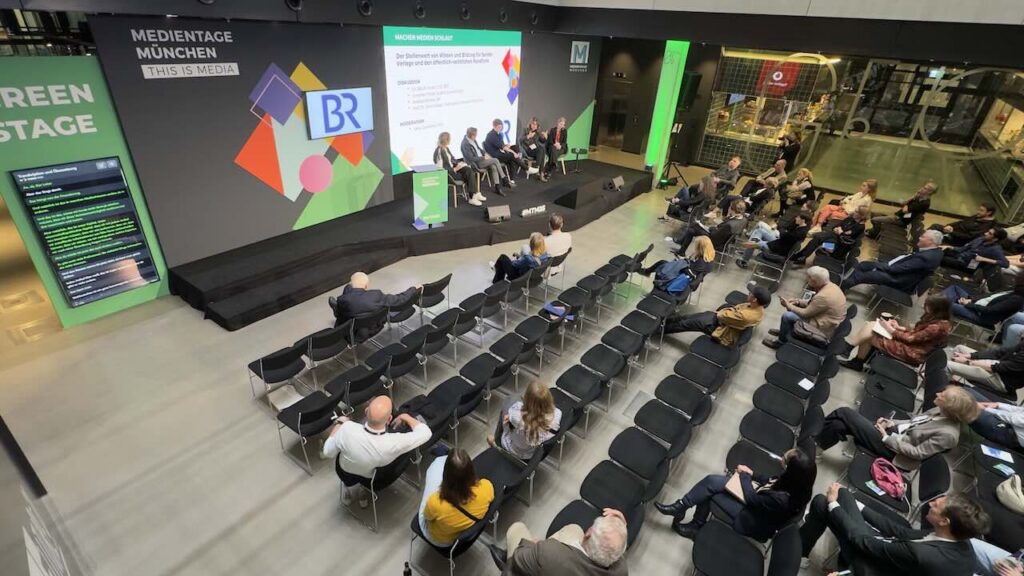
Keynote on the main stage
One speaker, one source language, multilingual audience. Captions on the LED wall in the room's primary translation language, plus the full 116-language set on attendees' smartphones.
Renting six interpreter booths costs a five-figure sum before anyone speaks — and then someone changes the panel at 19:00 the night before. Your audience already brought their phones; that's where they want the translation, not in a headset they queue for. Sponsors expect international press coverage. Press expects quotable soundbites. We rebuilt live translation around exactly that reality — captions on the LED wall, audio on every guest's phone, silent-disco channels for the VIP row, all from the same speaker feed.
LIVE · EN, DE, FR, ES · Medientage Munich
Modern conferences run with last-minute speaker changes, parallel breakout tracks, hybrid attendees and audience Q&A in three languages per session. Booking six interpreter booths for every scenario is no longer the right tool — and rebooking them at 19:00 the night before is impossible.
The teams running Medientage Munich, the German Bundestag, Digitaler Staat and Rulebreaker Congress all hit the same wall: they need a translation layer that scales with the programme, not against it. That's what this page is about.
Not a generic capability list. These are the six concrete scenarios our conference customers deploy the platform for — usually two or three at the same event.
One speaker, one source language, multilingual audience. Captions on the LED wall in the room's primary translation language, plus the full 116-language set on attendees' smartphones.
Multiple speakers, fast switching, occasional cross-talk. The system handles hot mics, identifies who's speaking when needed, and never loses the thread when someone jumps in.
Each room runs its own session, its own ingest, its own translation set. No cap on the number of parallel rooms. One dashboard for the producer; per-room QR codes for the audience.
The roving mic gets the same translation treatment. Whatever language the audience member speaks is auto-detected and rendered back to the speaker and the rest of the room in real time.
Remote attendees see live captions over the broadcast feed (HDMI / SDI / NDI). The same caption stream embeds as a subtitle track in Zoom Webinars, Restream, vMix or any custom RTMP setup.
Post-keynote press scrums and one-on-one interviews benefit from instant transcripts. International journalists get the quote in their language; your comms team gets the clean transcript for the press kit.
No new hardware to buy. The platform sits on top of your existing console and screens — ingest however you mix, output to whatever channel your guests are using.
The whole onboarding fits inside the standard 2-hour soundcheck window. Your existing AV crew runs it; we are on standby remotely (and on-site for events over 500 attendees).
Route the console's main-out (XLR, Line or AES) to a laptop on the show network. Open the browser, log in to the session, confirm the audio meter is moving.
CSV or paste into the web UI: speaker names, sponsor brands, product names, technical terms. The system applies them on every translated language from the first second.
Pull in a speaker who arrived early, run a 15-minute test on the stage with all caption channels live. Adjust display position, font size, language pre-selection. Done.
A livetranslation.ai engineer monitors the session remotely from minute one. If a speaker's mic drops, if the dictionary needs a hot-add, if a language channel needs to be enabled mid-session — one Slack/phone bridge handles it.
Asked by conference organisers, PCOs and event-agency producers in the discovery call. Answered straight.
There is no hard cap on simultaneous languages. The same speaker stream can be translated into all 116 supported languages at once. In practice, conference organisers enable between 4 and 20 languages depending on the audience composition — the language menu on guests' smartphones only shows the enabled ones.
Enabling or disabling a language is a one-click change in the dashboard, even mid-session.
Yes — this is one of the platform's strongest use cases. Each room runs an independent session with its own audio source, its own dictionary and its own enabled languages. You can run unlimited parallel tracks at the same event under one customer account.
Attendees scan a single venue QR code or per-room QR codes — both work.
The roving microphone feeds back into the same ingest channel as the main stage feed. Whatever language the audience member speaks is automatically detected and translated for both the speaker on stage and every other listener tuned into a different language.
No manual channel switching, no producer intervention. The hand-off between the speaker's language and the audience member's language is sub-second.
For conferences up to about 500 attendees, your existing AV team is enough — you hand us the main-out of the FOH console via the web platform, and we run the rest. Our team monitors the session remotely from minute one at no extra cost.
For larger events, regulated environments (government, finance, medical) or first-time deployments, we send a remote engineer who joins the call from soundcheck through final cue. Included in the quote.
Plan for approximately 90 minutes between kit arrival and a working confidence test: 30 minutes of cabling and audio routing, 30 minutes uploading the custom dictionary (speakers, sponsor brands, technical jargon), and 30 minutes for a 15-minute test run with one of the speakers on the actual stage.
The whole onboarding fits inside the standard 2-hour soundcheck window.
Yes. The live caption layer can be overlaid on the broadcast feed via HDMI, SDI or NDI output to your vision mixer (vMix, ATEM, TriCaster, OBS), or embedded as a separate subtitle track in your livestream platform. Remote viewers see captions in their selected language with the same sub-second latency as in-room guests.
Both stream attendees and in-room guests use the same smartphone QR-code experience for audio translation.
Each use case has its own setup pattern, pricing logic and trust references — same platform underneath.
Bring an audio clip from a recent session and your speaker list. We'll run it live in the demo — not a slide deck, not a canned video. If it's not the right fit for your conference, we'll say so on the call.
Book a 15-minute live demo