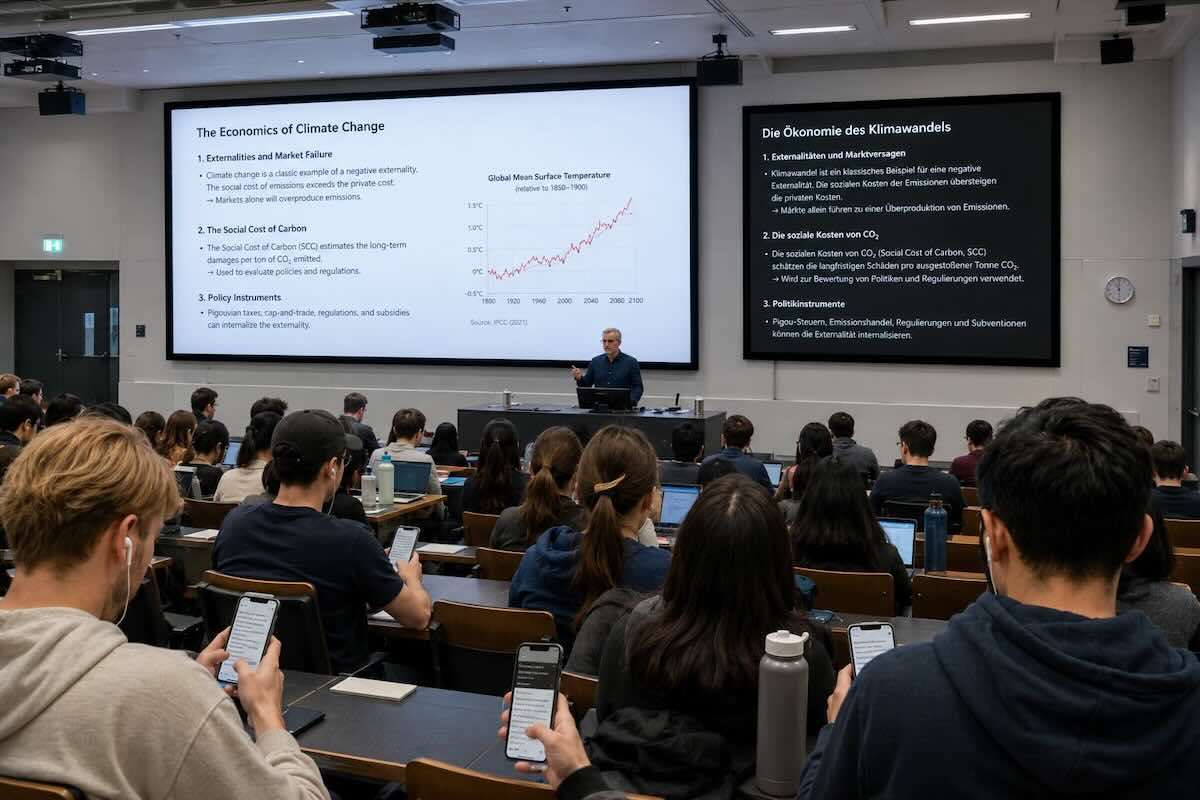
Large lecture halls
Recurring weekly lectures with 100–800 students. Captions on the lecture-hall screen during class; the LMS gets the transcript and translated audio track within minutes of the session ending.
Half your engineering cohort thinks in Mandarin, Spanish, Arabic or Hindi — and your lecturer probably isn't a native speaker either. BFSG and EAA made captioning a legal floor in June 2025, not a feature you can defer. And the four hours it takes to manually subtitle one lecture-hour? Nobody in the IT office has them. We rebuilt live translation around exactly that reality — built for universities, not bolted on.
So if we look at the tertiary structure of this protein, the hydrogen bonds determine the folding pattern…
“Wenn wir uns die Tertiärstruktur dieses Proteins anschauen, bestimmen die Wasserstoffbrücken das Faltungsmuster…”
A typical engineering lecture today has students whose strongest language is Mandarin, Spanish, Arabic, German, French and Hindi — all sitting in the same room, listening to a lecturer who's often not a native speaker either. Add the BFSG and the EU Accessibility Act (in force June 2025) and captioning becomes a legal floor, not a feature.
Manually subtitling recorded lectures takes 4–8 hours per hour of content. By the time the transcript is published, the next lecture has happened. AI translation closes that loop in minutes — this page is about how that fits inside a real university workflow.
Six concrete patterns universities deploy live translation for. Most institutions start with a single faculty pilot — a department with strong international intake — then expand campus-wide in the following semester.
Recurring weekly lectures with 100–800 students. Captions on the lecture-hall screen during class; the LMS gets the transcript and translated audio track within minutes of the session ending.
Smaller groups, more interactive. Students discuss in their own language, the system translates back to the teaching assistant — particularly valuable for language schools and exchange programmes.
Multilingual examination panels, often with one external examiner abroad. The PhD candidate defends in their preferred language; every panellist follows in theirs. Captioned record for the doctoral committee.
Visiting scholars, doctoral colloquia, summer schools. Same platform that runs the weekly lecture handles the international workshop. The campus AV team needs no new training.
Recorded courses on edX, Coursera, FutureLearn, the university's own platform. AI captioning and per-language transcript multiply the addressable audience without the cost of human subtitling per language.
Captions, transcripts and audio descriptions delivered by the accessibility office for deaf and hard-of-hearing students. The same infrastructure that serves international students serves accessibility — one workflow, two compliance wins.
Designed against WCAG 2.2 AA, the German Barrierefreiheitsstärkungsgesetz (BFSG, June 2025) and the European Accessibility Act (EAA, June 2025). Documentation ready for your audit.
All processing on EU servers operated by VIDEO.TAXI / TV1 GmbH, Germany. Article-28 DPA available before pilot. Compatible with German Landeshochschulgesetze and Datenschutzbeauftragte requirements.
The platform operates at the session level, not the student level. Matriculation numbers, names and exam records never enter the pipeline — the recording is anonymous unless your LMS chooses otherwise.
Captions arrive as a live subtitle track; the post-lecture transcript uploads automatically to the course's media library. Setup is one IT ticket, not a procurement project.
Universities adopt this in stages: one pilot department, expansion to the school, then institution-wide. The workflow below mirrors how the early customers actually rolled it out.
Pick a degree programme with strong international intake. Provision LTI in your LMS, upload the course dictionary, train the AV team in a 30-minute session. First lecture live and recorded within the semester's first week.
Roll out to the rest of the school. Course dictionaries are inherited at the department level; AV-team training is reused. Accessibility office signs off on the BFSG/EAA documentation against real lecture data.
Central IT enables the integration for additional schools. Per-school dictionaries inherit from the central glossary. MOOC, online and executive-education content moves into the same pipeline.
Course dictionaries are versioned per semester — new theorems, new lab equipment, new visiting lecturers. Teaching assistants get an editor to correct the source transcript; corrections propagate to every translated language.
Asked by central IT directors, accessibility officers, faculty deans and procurement leads on the discovery call. Answered straight.
Yes. Live captions embed into the lecture livestream via standard LTI 1.3, and post-lecture transcripts upload automatically into the course's media library. Tested with Moodle, Canvas, ILIAS, Stud.IP, Blackboard Ultra and OpenOlat.
Each transcript is per-language and aligned to the recording timeline for search and click-to-jump playback. For institutions using Opencast or BigBlueButton, captions flow as a standard WebVTT subtitle track without extra integration work.
Yes. Live captions, post-lecture transcripts and translated audio are designed to meet WCAG 2.2 AA, the German Barrierefreiheitsstärkungsgesetz (BFSG, in force June 2025) and the European Accessibility Act (EAA, in force June 2025).
The platform serves deaf and hard-of-hearing students by default — faculty do not need to enable extra features per lecture. Accessibility documentation (VPAT-equivalent, WCAG conformance statement) is provided for your audit.
All audio and transcripts are processed and stored on EU servers operated by VIDEO.TAXI (TV1 GmbH, Germany). No data leaves European infrastructure. A standard Article-28 GDPR Data Processing Agreement is available before the first session, with technical and organisational measures aligned to BSI Grundschutz.
Importantly, the platform operates at the session level, not the student level. Matriculation numbers and student names are never required — the recording is anonymous unless your LMS chooses to attach identifiers. Retention is configurable down to immediate deletion.
Higher-education customers are billed per semester or per academic year, either per-seat (number of enrolled students) or per-hour of recorded lecture content — whichever fits the institution's budget structure better.
Pilot programmes covering one faculty or one degree programme are available before institution-wide rollout, typically at a flat semester rate. Quotes are provided after a 15-minute demo call.
Yes. After each lecture, the lecturer or teaching assistant gets a browser-based editor with the source transcript and all translated versions side by side. Edits to the source propagate automatically to every translated language — you don't fix the same typo six times.
The corrected transcript replaces the auto-generated one in the LMS without a second upload step. Some universities require this approval step before publication; others publish auto-generated transcripts immediately and correct only when flagged.
Each course gets its own custom dictionary: technical terminology, lecturer names, recommended-reading author names, lab equipment, organism names, theorem names. The dictionary is applied across all translated languages from the first sentence — no warm-up period.
Dictionaries can be shared across courses in the same department and are versioned per semester. The faculty owns the dictionary, IT owns the deployment, and the central glossary improves with every semester.
Each use case has its own setup pattern, pricing logic and integration story — same platform underneath.
Bring a recording of last semester's lecture and your course dictionary. We'll run the captioning, the LMS upload and the per-language transcript end-to-end on the demo call. If it's not the right fit for your institution, we'll say so.
Book a 15-minute live demo